
Say Goodbye to <InstallmentMarkers>...
…And Say Hello to automated chapter parsing for all upload formats.

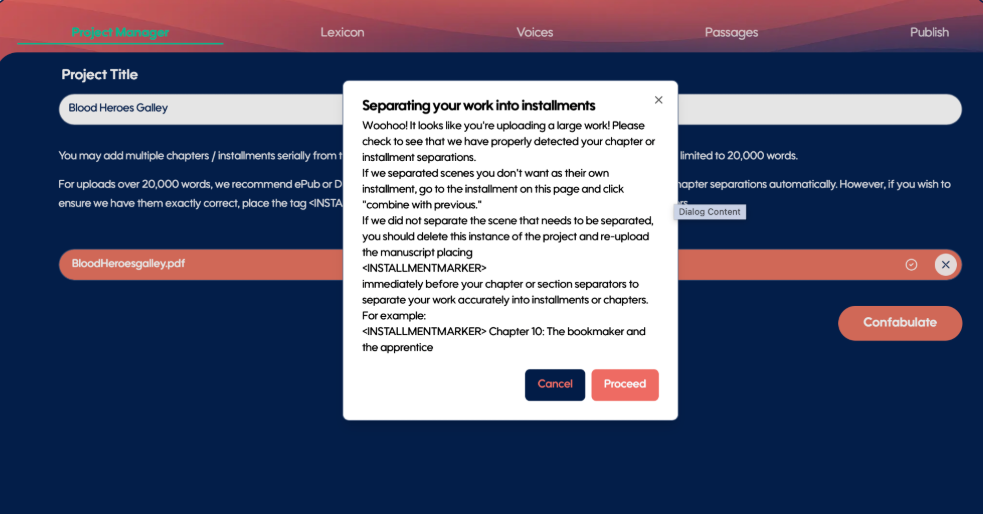
Automatic Chapter Detection
No more <INSTALLMENTMARKER> tags.
Previously, manuscripts over 20,000 words required <INSTALLMENTMARKER> tags to be placed immediately before chapter or section headers so Spoken could accurately separate your work. We also recommended ePub files with individually separated chapters for longer uploads.
That manual step is now gone.
Spoken can now automatically detect, separate, and arrange chapters in Word, text, and PDF uploads, using the same intelligent chapter organization already available with ePub files.
Just upload your manuscript. Spoken handles the structure.
Merge Chapters
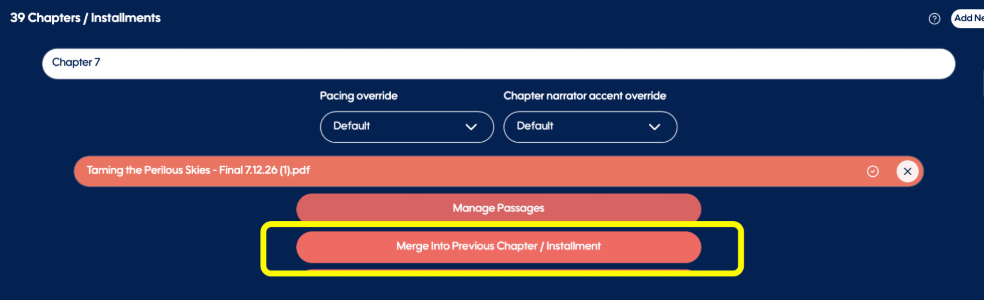
Automated chapter detection gives you a strong starting point, but you may occasionally want to adjust how your manuscript is divided.
You can now merge an identified chapter with the previous chapter directly in Project Manager, giving you an easy way to correct or refine chapter separation after parsing.
Performance Fixes
We’ve resolved an issue where chapter reordering in Project Manager did not always correctly carry over to the Passages tab.
Reordering is now correctly reflected throughout the project.
We continue to implement performance improvements and fixes across Studio for a smoother, more reliable production experience.
You didn’t like Installment Markers—and neither did we. Now, they’re a thing of the past.
